Friday, 8 February 2013

Laptop Specifications Toshiba Satellite C655-S5542


Laptop Specifications Toshiba Satellite C655-S5542 - The outside and the inside of the laptop Toshiba Satellite C655-S5542 is a matte black plastic printed with Toshiba Trax Texture. The entire casing is black, but gray Toshiba logo in the center of the lid. With classic style keyboard has a numeric keypad and full. Large flat keys give feedback chewy with a little inflexible. Space bar are very confusing visually, but that does not matter when it was used.

Laptop Specifications Toshiba Satellite C655-S5542 comes with Intel Celeron B815 Processor 1.6GHz with 3GB RAM, 320 GB hard drive, and Mobile Intel Graphics with shared graphics memory.
Laptop Specifications Toshiba Satellite C655-S5542 more:
Processor 1.6GHz Intel Celeron B815 Processor
Operating System Windows 7 Home Premium (64-bit)
3GB RAM
RAM Upgradable to
Disk 320GB SATA, 5.400 rpm
Screen Size 15.6
Screen resolution of 1366 × 768
Optical Drive DVD SuperMultiDrive
Optical Drive Speed ​​8X
VGA Mobile Intel HD Graphics
VGA Shared Memory
Wi-Fi 802.11b/g/n
Wi-Fi Model
Bluetooth Bluetooth 3.0
Mobile Broadband
Touchpad Size 3.2 x 1.6 inches
Ports (except USB) Ethernet; Headphone; Microphone; VGA; security lock slot
2 USB Ports
Card Slots 4-1 card reader
Warranty / Support Standard Limited Warranty 1-Yr Parts and Labor, 1-Year Battery
Size 15 x 9.8 x 1.1/1.6-inches
Weighing 5 pounds
Price Laptop Toshiba Satellite C655-S5542 $ 399

Thursday, 7 February 2013

Laptop Specifications Toshiba Satellite L755-S5166

toshiba laptop spesifications


Laptop Specifications Toshiba Satellite L755-S5166 - Toshiba Satellite L Series promises style and speed for the size of a laptop priced under $ 600. Laptop Toshiba Satellite L755-S5166 has a great view and a plus Core i3 Processor, 4 GB RAM, 640 GB hard drive and a 15.6 inch display with a combination that fits. As for the webcam can capture images with a resolution of 640 x 480, but it is a bit slow. For more details see Specifications Toshiba Satellite L755-S5166 below

Pros: Cool Display (vibrant Crisp), Attractive design, Good Performance for the size of the laptop price is under $ 600, frame rate adequate for low-end gaming

Disadvantages: Hard mouse button
Laptop Specifications Toshiba Satellite L755-S5166

processor
Intel Core i3-2350M 2.3 GHz

Operating System
Windows 7 Home Premium (64-bit)

RAM
4GB Upgrade up to 8GB

hard Drive
640GB SATA, 5.400 rpm

screen
15.6-inch

Screen resolution
1366 x 768

Optical drive
DVD SuperMultiDrive, 8x speed

VGA
Intel HD 3000 Graphics 64MB-1696MB shared

Wi-Fi
802.11a/b/g/n

Wi-Fi Model
NA

Bluetooth
NA

Mobile Broadband
NA

touchpad Size
3.1 x 1.6 inches

Interface / Ports
Ethernet, HDMI, Headphone, Kensington Lock, Microphone, VGA

USB
3 Ports

card Slot
2-1 card reader

waranty
one-year warranty

size
15 x 9.8 x 1.5 Inches

weight
5.3 pounds

With Toshiba Satellite L755 Laptop Specifications-S5166 above, the Toshiba Satellite L755 Laptop Price-S5166 at $ 599 price tag

Laptop Specifications Acer Aspire 5742 (6814)


Specifications Acer Aspire 5742 (6814) comes with core i3 2.53 GHz processor and 4GB of RAM, it is clear that this laptop can indeed be relied upon to do the job for office work, play videos or just browsing.

Both the lid and the deck of the Acer Aspire 5742 (6814) is a black matte finish that resists fingerprints. It has a grid like pattern grooves to look like diamond plating.

Laptop Specifications Acer Aspire 5742 (6814) is otherwise unadorned with stylish accent or special key. Above the keyboard is a prominent speaker grille, and on the left is the power button and status lights for hard drive and Wi-Fi.

Weighing 5 pounds even, 5742 is fairly portable for a 15-inch notebook. While you may not want to carry a laptop on a business trip, it's thin and light enough to carry around the house with ease.
Here is a Laptop Specifications Acer Aspire 5742 (6814)

processor
Intel Core i3-380m 2.53 GHz

Operating System
Windows 7 Home Premium (64-bit)

RAM
4GB

RAM Upgradable to
8GB

hard Drive
320GB SATA, 5.400 rpm

Screen Size
15.6

Screen resolution
1366 × 768

Optical Drive
DVD SuperMultiDrive

Optical Drive Speed
8X

VGA
Intel HD

VGA Memory
shared

Wi-Fi
802.11b/g/n

Wi-Fi Model
Atheros AR5B97

Bluetooth


Mobile Broadband


Size Touchpad
3.2 x 1.8 inches

Ports (except USB)
Ethernet, HDMI, Headphone, Microphone, VGA

USB Ports
3

Card Slots
2-1 card reader

Warranty / Support
One year limited

size
15 x 9.9 x 1.3 inches

weight
5 pounds

The price for Laptop Specifications Acer Aspire 5742 (6814) above is $ 558

Wednesday, 6 February 2013

Acer Aspire 5755-6647 Laptop specification and review


Acer Aspire 5755-6647 for $ 599 is to prove that you do not spend some more to get a good multimedia laptop. With Laptop Specifications Acer Aspire 5755-6647 15.6-inch LED screen, Core i5 processor and 6 GB of RAM, this is enough to handle everyday tasks as well as for your entertainment facilities.
design
Acer Aspire 5755-6647 comes with a low-key but looks comfortable. Equipped with a color glossy black plastic with a subtle striped pattern that sparkle in the light and combined with chrome Acer logo makes viewing more comfortable in perspective. Also in the interior color slate gray with long black speaker grille located above the keyboard. A brushed metal power button located on the top left corner to make it look perfect.
Audio
Laptop Specifications Acer Aspire 5755-6647 comes with Dolby audio is quite good. At maximum volume, the Acer Aspire 5755-6647 can be about filling a small room. Acer Aspire 5755-6647 with Dolby Advanced Audio control panel that allows us to switch between three preset audio modes namely music, movie or game.
Hot
After streaming video full screen for 15 minutes, the touchpad measured 89 degrees Fahrenheit, the normal size for a laptop. If above 95 degrees uncomfortable for a new laptop. At the G and H keys and the underside of the laptop was noticeably cooler in the range of 84 degrees.
Performance
Specifications Acer Aspire 5755-6647 Laptop Comes with Intel Core i5-2450M 2.5 GHz with 6GB RAM, 500GB drive, 5400 rpm, and Intel HD Graphics 3000 GPU with 128MB VRAM, Acer Aspire 5755-6647 can handle productivity tasks and play casual games. During our testing, we were able to stream music from Spotify while playing the "Bastion" in the Chrome Web browser with 6 tabs open in Google Chrome and Internet Explorer.
Battery
During the LAPTOP Battery Test (continuous Web surfing over Wi-Fi), Acer Aspire 5755-6647 can last for 4 hours and 44 mintues, which means it is 8 minutes shorter than the average for the major categories of 4:56. For more details see Specifications Acer Aspire 5755-6647Laptop Specifications Acer Aspire 5755-6647
ProcessorIntel Core i5-2450M 2.5 GHz
Operating SystemMS Windows 7 Home Premium (64-bit)
RAM6GB
RAM Upgradable to8GB
Hard Drive500GB SATA, 5.400 rpm
Screen Size15.6 "
Screen Resolution1366 × 768
Optical DriveDVD /-RW DL
Optical Drive Speed8X
Graphics CardIntel HD Graphics 3000
Video Memory128MB
Wi-Fi802.11b/g/n
Wi-Fi ModelIntel Centrino (R) Advanced-N 6205
BluetoothNA
Mobile BroadbandNA
Size Touchpad3.4 x 1.8-inches
Ports (excluding USB)Gigabit Ethernet; HDMI; Headphone; Kensington Lock; Microphone; USB 3.0; VGA
USB Ports3
Card Slots4-1 card reader
Warranty / SupportOne-year Limited International Travelers Warranty
Size15 x 10 x 1.3 inches
Weight5.6 pounds
The price for the Acer Aspire 5755-6647 Laptop specification above is $ 599

Tuesday, 5 February 2013

Specifications DELL Vostro 1088 Win Vista Home Basic Depp Cherry Red


Specifications DELL Vostro 1088 Win Vista Home Basic Depp Cherry Red

brand Dell
Depp Color Cherry Red
Processor Intel Core 2 Duo Processor T6670 (2.2 GHz, 2MB L2 cache, 800MHz FSB)
Ubuntu Linux Operating System 8:04
4GB of DDR2 800MHz RAM DDR2 4GB Max
Hard Drive 320GB SATA HDD
Optical 8x DVD + / - RW (Dual Layer) Drive
Display 14.1 HD Wide LED Display with Anti Glare & True Life
Video Card ATI Mobility Radeon HD 4330 with 512MB dedicated graphics memory
WiFi 802.11a/g/n Wireless Mini Card
Internet 10/100/1000 Ethernet LAN
Modem 56K Internal Modem
Bluetooth Bluetooth
Camera Integrated Webcam 2 Mpx
PC Card Slots 1 ExpressCard 54mm slot
Card Reader Integrated card reader
I / O Ports I / O Ports: 4 USB 2.0, VGA, IEEE 1394a, RJ11, RJ45, Headphone & Microphone jack
2:11 Weight Kg
Warranty 1 Year
Chipest Intel 45 Express Chipset
Other Included Dell Case

Specifications Toshiba Satellite L735-1010X


Specifications Toshiba Satellite L735-1010X
Processor Intel Core i3-2310M Processor (2.10 GHz, 3M Cache)
Operating System Microsoft Windows 7 Home Premium
RAM 2 GB DDR3 SODIMM PC-10600
Intel HM65 Chipset
Hard Drive 500 GB (SATA)
Optical DVD ± RW
Display 13.3 HD Clear SuperView LED Backlight Display
Video Card nVidia GeForce 315M - 1GB
WiFi IEEE 802.11b, IEEE 802.11g, IEEE 802.11n
Internet 10/100 Mbps
Bluetooth Bluetooth v3.0 + HS
Card Reader SD, MMC, Memory Stick / Stick PRO
I / O Ports 2x USB 2.0, 1x USB 3.0 (Sleep and Charge), VGA, HDMI, LAN, Audio
2:05 kg weight
Warranty 1 Year

Monday, 4 February 2013

Specifications Acer Aspire V5-171-6867


Acer Aspire V5-171-6867 is a semi mini laptop that has 11.6-inch screen with 1366 × 768 pixels (resolution is quite high, even higher than other laptops), in which in Arm by Standart graphic video, use the Intel HD VGA graphics 4000. although Intel HD Graphics 4000 is a mini laptop, but able to run the game "World of Warcraft", and mampun produce 52 frames per second on Auto Mode (resolution of 1366 × 768 pixels)


Acer Aspire V5-171-6867 make a Processor Intel Core i5-3317U, Clock Speed ​​1.7 GHz and is supported by a capacity of 6 GB of RAM. specification of this laptop is quite high, for the class of mini laptops, even higher than other laptops on the market. Acer Aspire V5-171-6867 you can get only with money Rp 5.216 million. Do you tertari with Acer Aspire V5-171-6867?


Specifications Acer Aspire V5-171-6867

Processor: Intel Core i5-3317U, 1.7 GHz Clock Speed
  Operating System: Windows Seven Home premium using 64 Bit
  RAM: 6 GB, can be upgraded to 8 GB
  Hard Disk: 500 Gb, with 5400-rpm Speed​​, Sata Hard Disk
  screen: 11.6 inches, with a resolution of 1366 × 768 pixels
  VGA: Using the Intel HD graphics 4000
  Wi-Fi: yes, Wi-Fi 802.11 B / g / n
  Bluetooth: yes, Bluetooth 4.0
Port: LAN, HDMI and headphone
  Card reader: yes, 2-1 Card reader
  Warranty: Standard 1-year warranty
  Dimensions: 11.2x8x1.1 inches
  Weight: 1.5 Kg
  Battery: Lithium ion

Specifications Toshiba Qosmio F750-1011X


Toshiba Qosmio F750-1011X is a proprietary HP laptop that has pretty good specs, and on sale at a fairly cheap price, you do not need to spend much money to buy this laptop. The first impression when I saw this laptop is, a body that looks elegant and more beautiful, at the front there is a layara LED WXGA 15.6-inch size, the laptop screen is capable of producing a resolution of up to 1366 × 768 pixels, Toshiba Qosmio F750-1011X also supported by VIDEO Graphics Nvidia GeForce GT 540M with 2 GB VRAM. vga contained on laptop Nvidia GeForce GT 540M, makes this laptop suitable for use as a "Laptop Games"


Qosmio F750-1011 in Arm by core i7-2670QM processor, 2:20 GHz Clock Speed​​, 6 MB Cache and DDR3 RAM with a capacity of 4 GB, you can also increase the amount of RAM (up to 8GB). on the inside of the Toshiba Qosmio F750-1011X there is a hard diks SATA, 640 GB 7200-rpm speed, hard disk capacity is quite large, able to accommodate a lot of your files.

Specifications Toshiba Qosmio F750-1011X

Processor: Using Core i7-2670QM processor, 2:20 GHz Clock Speed​​, 6 MB Cache
RAM: Using Ram 4 GB, DDR3 PC-10600, can be upgrade up to 8 GB
VGA: Nvidia GeForce GT 540M
VRAM: Video RAM 2 GB
  Screen: Using LED WXGA display, 15.6 inches, with a resolution of 1366 × 768 pixels
  Hard Disk: Using HDD 640 GB, Serial ATA 7200RPM
  Optical Drive: yes
  LAN: yes, Network speed 10/100 Mbps
  Wlan: yes, Wi-Fi 802.11 b.g.n.
  Bluetooth: yes, Bluetooth v 3.0
  Card Reader: yes, 5 in 1 Card Reader
  Port: USB, VGA, HDMI, LAN, Audio
  Operating System: Using Windows Seven home permium 32 bit/64bit
  Weight: 2.9 kg
Warranty: 1 Year Warranty

Specifications Dell Inspiron 15R SE

Dell Notebook Inspiron 15R  SE has looked bigger size, with dimensions 14.9x10x1.3 inches and uses 15.6-inch screen. The first impression when you saw this notebook is an elegant body and quite beautiful, because in layered black anodised aluminum and silver plastic. Dell Inspiron 15R notebook SE in the Arm with a high specification, in which there is an Intel Core i7-3612QM and a capacity of 8 GB of RAM. Specifications RAM and processor is decent enough to run several programs or games weight


Dell Inspiron 15R SE using the hard disk capacity is quite large (1 TB Hard disk) and supported by the SSD hard disk (32 GB). Hard disk SSD boot function to speed up the prosess, so when you turn on the notebook, you will notice a faster boot-process.

Specifications Dell Inspiron 15R SE

Processor: Intel Core i7-3612QM
Operating System: Using Windows Seven Home Premium (64-bit)
RAM: 8 GB RAM Using
Hard Disk: 1 TB + 32 GB SSD hard drive (5400-rpm)
Hard Drive Type: SATA Slot H + mSATA SSD
Screen: 15.6-inch, with a resolution of 1900 × 1080 pixels
Optical Drive: yes, DVD RW
VGA: Intel HD Graphics 4000 / AMD Radeon HD 7730M
Video Ram: 2 GB VRAM
Wi-Fi: yes, Wi-Fi 802.11 a / g / n, Intel Centrino Advanced-N 2230
Bluetooth: yes, Bluetooth 4.0
Port: LAN, HDMI, Audio Jack, USB 2.0, USB 3.0 and VGA
Dimensions: 14.9x10x1.3 inches


Specifications Acer Aspire V5 431 987B2G50


Acer Aspire 431 987B2G50 V5 is the old laptop that is still sold in the market, even though this laptop has lower specs, but there are still customers who prefer the laptop. in addition to the sale at a fairly cheap price, Acer Aspire 431 987B2G50 V5 also has some advantages. kelebuhan one is to use the hard disk with a capacity of 500 GB. Her classmate laptop - mostly using 320 GB hard disk.

Acer Aspire 431 987B2G50 V5 is supported by Pentium B987 Processor with 1.5 GHz Clock Speed​​, and is supported by 2 GB RAM - if you still need a larger ram, this ram can be upgraded up to 4 GB. spec is able to run OS windows seven and run some heavy software.

Specifications Acer Aspire V5 431 987B2G50

  Processor: Intel Pentium B987, 1.5 GHz Clock Speed
  RAM: 2 GB RAM, DDR3
  VGA: VGA Standard Intel ® HD Graphics 4000
  VRAM: no
  Screen: Using LED WXGA display, 14 inches, with a standard resolution
  Operating System: Using windows seven home basic
  Hard Disk: use SATA HDD, 500 GB, 5400-rpm Speed
  Optical Drive: yes, DVD RW
  Wlan: yes, Wi-Fi 802.11
  Bluetooth: -
  Card reader: yes
  Port: USB 2.0, USB 3.0, VGA, HDMI, LAN, Audio Jack
  Dimensions: -
  Weight: 2.4 Kg
  Battery: Lithium Ion Battery Uses
  Warranty: 1 Year Warranty Standard

Saturday, 29 September 2012

Learnings from a Paypal Hacking Experience: Part Two - What to do after your Paypal gets hacked

In Part One you were shown what a Paypal hacker might do to your account. This part gives you advice on how to proceed after you get hacked.


What you may need
1) email to use besides the one which you used on your hacked Paypal account
2) phone line
3) optional is a good budget card for calling overseas if you are not calling within the US

What to do
1) Review the actions of the hacker

Each Paypal transaction has an email notification. If you are able to see the list of transaction that hacker did through your email then list them all. Write down on paper also the transaction ID of each monetary transaction that happened. You need this in case you have to detail to Paypal which transaction/payments you are contesting as unauthorized payments.

It will be good to have old eBay transaction ID also which happened before the hacking in case you have to prove that you are indeed the real owner of the account.

2) Create a new Paypal account.
- When you get hacked you will likely lose the ability to login to your account. When you call eBay you will be ask for a code to verify your identity. Technically your Paypal account is a link to your identity hence they have to use it for verification of calls.

3) Log-in to your new Paypal account and get the Call contact code

Click the "Contact Us" link at the bottom. In the new page click the "Call Us" link. The next page will show you the 6-digit passcode. This passcode expires after 60mins so this means you should be able to call Paypal within the 60 min period if not you need to re-do steps 2 and 3 to get a new passcode.

4) Call Paypal

This is the US number for Paypal  1-402-935-205

Since it is a US number below is their available time to entertain calls
4:00 AM PST to 10:00 PM PST Monday through Friday
6:00 AM PST to 8:00 PM PST Saturday and Sunday
*PST is GMT - 7:00  or user this link to convert to your time zone

When you get hacked it is A MUST to CALL Paypal immediately after the hacking happened. This is to ensure that all transactions done by the hacker is reversed as soon as possible. Response time of email is slow and unsure and by the time someone from eBay have contacted you through email the hacker might have already created a web of transactions to hide, use or withdraw the money already.

Upon calling Paypal they have a smart system which will just ask you for the question you have in mind. This smart system looks for keywords within your sentences and will automatically play a recorded answer to you. If you want to talk to a person just utter the words "Talk to an agent" . If that doesn't works try also variations like "Talk to a person". This will force the smart system to redirect you to a more flexible call center agent that can listen to your story and assist you properly.

5) Explain your story briefly and request reversals of unauthorized payments

When talking to the call center agent be brief and concise. Just explain that your original account has been hacked and you were not able to use it. Explain that the hacker may have also removed your original email linked to that account but you will be able to supply some transaction IDs before the hacking to prove your identity. Do not panic or be hysterical or be angry. Just stay calm and make sure to pause and allow the call center agent to react and help you. If you keep on talking and lose your cool then it will just create room for misunderstanding.

The things you have to request the agent are
a) Reverse all unauthorized transactions.
This includes all payments or transfers done. If possible Make sure you have an idea how much was you initial balance was before the hacking so you and the agent can gauge which actions are caused by the hacker.

b) Allow you to gain access to the account.
Get help from agent to remove all emails linked to the account and make him add only one email address which you own. From here have him initiate and change password request immediately.

c) Remove unauthorized users
For those using business accounts or upgraded to business accounts have the agent remove all those in the manage users list. In case the agent says you have to do this yourself, just request that he be still on the line while you do it for safety precaution.

My Account > Profiles > My Settings > Manage Users > Update > Select the radioboxes of the users and click the remove button.

The hackers will usually hide us another user of this account through through the Manage Users funcationality of business accounts. This means he will be able to manage this account with his own password. So you must remove the hacker from the list. If you are using it yourself it is a better precautionary action to delete all in this list and just rebuild it yourself later.

6) Monitor your email for notifications about the reversals

Try to check you email every hour or if possible more frequently to check if the reversal of the unauthorized transactions have already gone into your account. This way you also monitor if the hacker is able to gain access again to your account.

7) Optional: Withdraw your Paypal balance

When the reversals have been completed in your favor it would be best to withdraw your money to your bank account immediately. Do not think anymore of the charges of Paypal and the bank you may have to incur in the process because you never know if the hacker will be able to login to your account and strike again! As much as possible to don't keep a lot of money in your Paypal account to avoid bad hackers from being enticed to use it.


If above somehow has helped you hope you can check out our online store and if you like something make a purchase. On Part Three, we offer suggestion how to keep your Paypal account safe.

Learnings from a Paypal Hacking Experience: Part One - What the hacker does to a PayPal account he hacks


   For most of us especially those who sell online like on eBay, PayPal is very important. It enables buyers to have the security of paying online and for sellers to have the opportunity to receive payments fast and across international borders. However the occasional bad hacker (yup, there are good hackers also) comes along and mess with your happy online existence.

   Our store Paypal account was the hacked recently and we've thought it best to narrate the experience here in order to help and warn other people. The article will be divided into 3 parts to explain what the hacker does to an account he has hacked (Part One), how to deal with it immediately (Part Two) and precautionary steps to avoid it from happening (Part Three).

Part One - What the hacker does to a PayPal account he hacks

   The hacking started at about 4 AM (GMT +8), a wee hour of the morning where most people would be asleep. At this time PayPal office would also be offline because they are located in the US and it isn't their office hours yet.

   Upon gaining access to our account the hacker did several activities immediately. We know he did them because of the email notifications PayPal has sent for each of the activities. Luckily we still have access to our email account. Below are the list of actions done with our PayPal account.

1) Reset the PayPal password
       It is still quite the mystery how the hacker was able to reset the password when the only way to do so was to gain access to the emails linked to it. One thing is for sure, change your email and PayPal password immediately!!!

    2) Sent the money to another PayPal account

       The hacker is a veteran and knows that most PayPal account is linked to a credit card so in our case he sent payment transactions to another PayPal account in an amount more than the current balance we have. This is likely to test how much he will be able to get from our credit card. The hacker would send the money back and forth so there was several Payment Sent and Refund of payment in our email thread. In our case money was moved back and forth using two other PayPal accounts which we suspected to be hacked as well.

       We acted quickly and was able to retrieve the money within the same day. However the hacker is very persistent. Just 6 minutes after the money was sent back to our account the hacker opened our PayPal account again and transferred all the money to another account! Given the very short period when he noticed there was money in our account either he was online or is using a software to monitor and / or automate the process. One more scary realization is that despite us changing the passwords on the email and Paypal, the hacker still managed to go inside our account and send payment to another account. Given in this second attempt he no longer had to change the Paypal password then it means he must have other ways to log-in to the account. We will explain how he did this later.

       Now because the hacker was acting fast to move the money for the 2nd try he may have gotten sloppy or simply arrogant to show how clever he is. The final email the money was sent to was a Paypal account under Guadalupe Gabuna. A Google search of the name revealed many other people scammed by this person hence the name is announced in this post for future reference. Also adding to list of things to note is that the account email used was paypal.contact@yahoo.com, also it shows other email noted on the references of that transaction which are onlines59@yahoo.com and pinoy.hosting@yahoo.com. Be wary of that name and emails because he is a hacker and scammer. Just search his name and you would know.

    3) Changed the security questions

        When you reset your password, a link would be sent to your primary email. It would be opened to a browser where there are two security questions that you must answer correctly first before you are allowed to reset your password. By changing the security questions then even if the account is linked to your email you lose the ability to change password instantly. We were never able to reset our password until we called up PayPal's hotline for help. We will discuss the details of how we dealt with it in a Part two post.

    4) Changed the primary email address

       We have more than one email linked to our PayPal. The hacker used one of our linked emails and made it the primary email. This would throw us off-guard when understanding the history of how the money was moved. He has changed the primary address 3 times and moving money in between each change. If you have more than one email linked to your PayPal account then check them thoroughly also to get a clear view of the history of actions done to your account. And reiterating again change your passwords immediately!!!

       On a side note if you are using Gmail account the conversation view is turned on by default which makes reading the whole story based on the order it was done a bit confusing. Turn off conversational view to understand the whole history of the actions of the hacker better. If you don't know how to turn it off just read this how-to post.

    5) Refunded the money back

       After making a payment the hacker would refund the same amount. Thinking about it the main reason the hacker is adding a refund in the history of transactions so that in your email list perhaps would be to make you think that PayPal has safely sent back your money. Paypal does have some safety mechanisms to check fraudulent activity but they aren't absolutely foolproof so you should not be complacent and let the word Paypal refund in your email history fool you.

       Do note that when the money is refunded it goes to your Paypal account balance and not back to your credit card so you will still be billed in your credit card unless PayPal is able to help you reverse the transaction that caused the charging to your card. See an example at the bottom of this page of how money could flow across hacked accounts.

    7) Send you invoices from another Paypal account

       This is another transaction to throw you off. The hacker will send invoices likely from another hacked account. He will even send a reminder of the invoice to add more emails in your inbox to confuse you. We know this is merely to confuse because amounts in this invoice is different from the amount of the Payment Sent transactions which he will do after making the invoice. Plus the hacker never paid through the invoice. The money was alway transferred through Payment Sent transaction.

    5) Removed the linked cards and bank accounts

       When the hacker is able to maxed out the linked credit card and transfer the amounts to your PayPal balance then he would remove it. They would also remove your bank account because these  card and bank account numbers can be a source of identification when you call PayPal. Their full numbers is not visible so there is a possibility for you to use them to identify yourself when PayPal needs to confirm that you are indeed who you say you are when you try to reset your password or talk to them. The hacker can't risk it happening so he will remove them.

    6) Added a new email account and changed the primary email

       On the third time the hacker changed the primary email address he first added a new email. For reference purposes the email added was pinoy.hosting@yahoo.com. We have good reason to believe that this may be a dummy email because despite it sounding like a legitimate business this email or even the service with that name is unsearchable.  The name is also linked to a Paypal account under Guadalupe Gabuna which based on Google search has hacked a lot of other accounts also.


    7)* Added a new user linked to the account. Hacker may have to upgrade your account to Business type first.

        It has an asterisk because this particular action somehow has no email notification. It may or may not be added after the primary email change but this Add User is very crucial to the hacker gaining access to the Paypal account even after you have changed your email and Paypal password. With a new PayPal user authorized to access the account the hacker can log-in using just a username based on your own name and his own password anytime! 

       Example if the account is under the name James Lee then the hacker would use a username like JAMESLEE or LEEJAMES give this user all possible permissions and put his own password to it. Therefore if you look at the the last login located at the top right side of your Paypal Overview screen you might just overlook checking the dates and time thinking that JAMESLEE or LEEJAMES is still you. For a business account the last login section should show the email you used to log-in and not a username!

       By having this authorization he may also call PayPal and assume your identity or inform them he has authorization on the account given he is a valid user! It's not just a possibility it did happen to other victims of the hacker.

       Adding a new user to manage the PayPal account is applicable only to business account type. If you have a personal account the hacker would have to upgrade that account also to business type so that he can add a new user. This fake user created by the hacker must be deleted immediately after you gain access to your account. We will detail how to do that in a part two post.


    8)* Changed the account name.
       It has an asterisk because this particular action somehow has no email notification. He will rename it to something generic that is similar to your nature of your use of the account. Example if you sell tickets online he will name it travel agency. If you are more a buyer he will name it ebay shopper and so on.

       The idea here is so that he can cover his tracks better. It is easier for the hacker to hide when doing a "Sent Payment" transaction because the email does not show the email of who it was sent to. Also by exchanging it with a generic name it will make it harder for you to track down the owner of the hacked account where the payment is sent. Changing the name could possibly also slow down the detection rate of PayPal's programs when he does the transfer of the stolen funds into his own PayPal account.

       Above where the actions done by the hacker in our account. If you want to read more detailed experiences of others hacked by this particular hacker just Google search for Guadalupe Gabuna. 


     ----

     This is a sample overview of how the flow of money may happen when the hacker gets hold of your PayPal account. Local currency used here is Philippine Pesos.
     

    Given:
    Your PayPal balance = P10,000
    Your Credit Card Usable Limit = P15,000
    Your Credit Card Billable Amount = P0
    Other Paypal Account 1
    Other Paypal Account 2
    HACKER's real PayPal Account


     1) Hacker sends payment of P30,000 to  Other Paypal Account 1
    Your Paypal balance = P10,000
    Your Credit Card Usable Limit = P15,000
    Your Credit Card Billable Amount = P0

    Other Paypal Account 1 balance = P0

    This transaction will not push through because the total possible money to get is P25,000 only. (Paypal balance + Credit Card Usable Limit) The card will not to be charged an amount more than its limit.


    2) Hacker sends payment of P19,000 to  Other Paypal Account 1
    Your Paypal balance = P0
    Your Credit Card Usable Limit = P6000
    Your Credit Card Billable Amount = P9,000

    Other Paypal Account 1 balance = P19,000

    The P10,000 will be removed from your PayPal balance and the P9,000 will be removed from your credit card. Your credit card will bill you P9,000 already!

    3) Refund the money from Other Paypal Account 1 back to your account.
    Your Paypal balance = P19,000
    Your Credit Card Usable Limit = P6,000
    Your Credit Card Billable Amount = P9,000


    Other Paypal Account 1 balance = P0
    When the refund happens note that the money goes to your PayPal balance. The charge to you credit card will NOT be reversed and your credit card will still bill you for that amount.


    4) Hacker sends payment of P25000 to  Other Paypal Account 2
    Your Paypal balance = P0
    Your Credit Card Usable Limit = P0
    Your Credit Card Billable Limit = P15,000 (P9000+P6000)


    Other Paypal Account 1 balance = P0
    Other Paypal Account 2 balance = P25,000

    The P19,000 will be removed from your PayPal balance and the P6,000 will be removed from your credit card. Your credit card will bill you P15,000 already!

    5) Refund the money from Other Paypal Account 2 back to your account.
    Your Paypal balance = P25,000
    Your Credit Card Usable Limit = P0
    Your Credit Card Billable Amount = P15,000


    Other Paypal Account 1 balance = P0
    Other Paypal Account 2 balance = P0

    Note again that the refund goes to your PayPal balance. The charge to you credit card will NOT be reversed and your credit card will still bill you for P15,000.
     6) At this point the hacker will do several separate send payment transactions. This may be a combination of $ and local currency. It is the point where the hacker will remove all your money and may put it accross different accounts. If the hacker is desperate or is just full of confidenhe will move all of it directly to his own PayPal account.


    Hacker sends payment of $200 (or P8600 assuming exhange rate P43 = $1 ) and P16,400  to Other Paypal Account 1

    Your Paypal balance = P0

    Your Credit Card Billable Limit = P15,000
    Other Paypal Account 1 balance = $200 and P16,400


    From Other Paypal Account 1 money is moved to the Hacker's real PayPal account
    Other Paypal Account 1 balance = 0
     HACKER's real PayPal Account = $200 and P16,400


    7) Just to throw you off guard,  the hacker may put in an extra step of sending  invoices from "Other Paypal Account 2" with amount different from the final transfer he made to "Other PayPal Account 1". This is just to trick you into thinking these may be the money which was transferred out of your account when in reality no payment was made for these invoices.


    If you like to know how a hacker may use the money read here.
    If the above happened to you read on to Part Two to know what action you should immediately take to get your money back!


    Monday, 27 August 2012

    How does a PayPal hacker use or turn the Paypal balance he hacked to real cash?


    1) Trading the PayPal account balances

        The hacker will sell the PayPal money to a willing buyer. If the hacker is selling Paypal balance in dollars then it would be at a low exchange rate and / or less the service fee. Selling in dollars is less suspicious as they can just justify that it was something earned from providing services to foreign clients who pay in dollars.

       To do this the hacker will likely do a "Sent Payment" transaction to the PayPal account of a legitimate buyer who does not know he is dealing with a hacker. The buyer upon receiving the amount will then send the money using local money transfer services.

       If the owner of the hacked account makes a claim, the one at the losing end will be the buyer of Paypal money from a hacked account. Because he has no way of retrieving the cash he has already sent to the scammer after PayPal reverses the "Sent Payment" transaction done by the hacker. The buyer will also be charged a penalty by PayPal for accepting the money taken from a hacked account.

    2) Use Paypal to buy stuff

       A second option  is that the hacker will use the money to buy something expensive online. For sellers it is best to ask your buyers who pay through PayPal to confirm their identity by providing a contact number where you can reach them. This should be a must if the buyer is using a newly created accounted and suddenly pays through PayPal. Check also if the buyer has used a verified PayPal account. You may also like to wait 1-2 days to let it clear because if the money used in paying is from hacking then it is likely to be reversed by PayPal.

    3) Transfer the money to a bank account

        Another option is the hacker may also try to add his own bank account into the hacked PayPal account and transfer the money into his account. Or if the hacker is desperate or just openly boasting his skills that he won't get caught he will move all of it directly to his own PayPal account and likely try to deposit it to his bank account. Transfer however of money to bank accounts should take 2-4 days to clear so chances are this would be the final option he would take.


    Sunday, 26 August 2012

    Here are tips in knowing how to make a strong password

    Upon learning about the pitfalls of password creation in a previous post you should next learn about how to create strong passwords.

    1) Think of a long phrase and use all that as a password.

    This comic from xkcd should help explain why long passwords are better than short passwords.

    example:
    iloveeatingicecreaminthemountain
    007isjamesbond

    2) You can make it longer by putting a hyphen or special characters in between the words
    example:
    barney-is-purple
    hello!world?

    3) If you are limited with the character to use make use of  capital letters and special characters and character substitutions.

    example: bornwild = B0rnW1ld3r
    in here the first characters of the word are in capitalized, vowels are substituted with numbers. You can make your own rules.

    Go ahead and make you password changes now. Feel free to test out your new passwords with Microsoft's password checker.

    Common pitfalls in using passwords

    Passwords are needed to secure your identity. You need a good password to ensure hackers will be kept away from getting precious information that will help them steal not just your identity but also the money from your credit cards and  bank accounts.

    However it is easy to succumb to some bad habits when it comes to using passwords. Here are the common pitfalls you should avoid


    1) Don't use the same password across all accounts

    Make sure your computer passwords, email, bank account, online wallet (like PayPal, AlertPay etc) , social accounts (Facebook, MySpace, Twitter), messaging accounts (Skype, Yahoo Messenger, etc) and such important accounts have different passwords.  It may be hard to remember them all but the precaution is still worth it. Any case there is always the option to recover password or you can do it old-style and write it in a notebook which you could keep safely tuck away always in a safe place and always away from prying eyes.

    2) Avoid using a short password

    Hackers typically try to guess what your password is. They make use of programs that can try hundreds of possible combination in just one minute. The shorter the password the easier it is to guess because the lesser the combination the computer has to test.

    3) If you must share your password change it afterwards

    You might have asked someone to check your email for you or post a photo online on your behalf. Even if you know that person very well it is still good practice to change your password. It is possible that although they will not do anything bad but what if they have accessed your information from an infected computer that has a keylogger which logs keyboard strokes and send this information to a hacker? If the account used for that password like your email may contain sensitive information then it is better to be on the safe side and change your password.


     4) Taking things for granted and not regularly changing your password

    You never know who is trying to hack your account. By regularly changing your account like as often as every 90 days or  at least once a year helps deter hackers who try to brute force their way into your accounts.

    How to turn-off conversational or threaded view in Gmail

    Conversation or threaded view in Gmail is very handy because it groups together emails with the same subject. However if you are trying to determine the order of how different emails went inside your inbox then the conversation or threaded can make it a little difficult.

    Here is a list of steps to help you turn-off conversation view in Gmail.


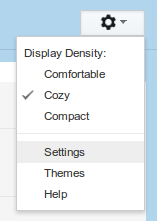
    1) At the top right section of the screen beneath your avatar picture look for the gears icon. Click on it and select "Settings".


    2) In the Settings go to General Tab  and look for Conversation View section.


    3) Select the "Conversation view off" and this will disable the threaded view of the messages.

    4) Just click the Inbox on the left side to confirm if it is indeed complete.


    Popular Posts